Showing posts with label Android. Show all posts

Wednesday, 4 September 2013

Sony "Xperia Z1" launched

Sony's upcoming flagship smartphone, the Xperia Z1 has been an attention seeker ever since the device was first spotted. Finally the Japanese major revealed its camera centric smartphone.While it was far from a surprise, Sony announced its newest flagship smartphone during its IFA press conference in Berlin on Wednesday morning.

Here are its great features:

s far as the main rear camera is concerned Sony says it has three times “clear image zoom” with zero loss of image quality. It has Sony’s G Lens with F2.0 and wide angle 27mm. It also has 1/2.3-type Exmor RS for mobile CMOS image sensor which is a high sensitivity sensor capturing details and crisp images, even in low-light conditions.

Read more at: http://www.firstpost.com/tech/sony-launches-waterproof-xperia-z1-with-20-7-megapixel-camera-1085181.html?utm_source=ref_article
s far as the main rear camera is concerned Sony says it has three times “clear image zoom” with zero loss of image quality. It has Sony’s G Lens with F2.0 and wide angle 27mm. It also has 1/2.3-type Exmor RS for mobile CMOS image sensor which is a high sensitivity sensor capturing details and crisp images, even in low-light conditions.

Read more at: http://www.firstpost.com/tech/sony-launches-waterproof-xperia-z1-with-20-7-megapixel-camera-1085181.html?utm_source=ref_article
  • There's a whopping 20.7 megapixels camera. That's a significant jump from the 13 megapixels of its predecessor. The sensor size, at 1/2.3-inch, is bigger than what you'd find on your normal smartphone and is similar to the Samsung Galaxy S4 Zoom's (1/2.33-inch). In comparison, the iPhone 5 uses a small 1/3.2-inch sensor, and the HTC One's UltraPixel sensor is slightly larger at 1/3-inch. The Nokia Lumia 1020 has the biggest sensor at 1/1.5-inch for smartphones running a modern OS.The Z1 also uses a wide angle 27mm f/2.0 G Lens, and Sony claims that its Bionz image processor has been tweaked to minimize noise in low-light environments.
  •  The 5-inch full HD screen phone has 2GB RAM and 16GB memory space.
  • The Xperia Z1 keeps its liquid-repelling credentials, along with sexy glass design. Its quad-core processor Snapdragon 800 MSM8974 has been supercharged to 2.2GHz with Adreno 330 graphics.
  •  Z1 is a powerful beast. To help keep it chugging along, Sony has whacked in a capacious 3,000mAh battery.
  • Uses the same Bravia technology found in its high-end TVs that boast rich colours, deep contrast, and pin-sharp clarity.
  • The Sony Xperia Z1 will run Android 4.2.2 Jelly Bean.
It will ship in three colours - Black, Purple, White.
The 5-inch full HD screen phone has 2GB RAM and 16 GB memory space. It runs Android 4.2 Jelly Bean and also has support for a MicroSD slot up to 64 GB.

Read more at: http://www.firstpost.com/tech/sony-launches-waterproof-xperia-z1-with-20-7-megapixel-camera-1085181.html?utm_source=ref_article

As far as the main rear camera is concerned Sony says it has three times “clear image zoom” with zero loss of image quality. It has Sony’s G Lens with F2.0 and wide angle 27mm. It also has 1/2.3-type Exmor RS for mobile CMOS image sensor which is a high sensitivity sensor capturing details and crisp images, even in low-light conditions.

Read more at: http://www.firstpost.com/tech/sony-launches-waterproof-xperia-z1-with-20-7-megapixel-camera-1085181.html?utm_source=ref_article
As far as the main rear camera is concerned Sony says it has three times “clear image zoom” with zero loss of image quality. It has Sony’s G Lens with F2.0 and wide angle 27mm. It also has 1/2.3-type Exmor RS for mobile CMOS image sensor which is a high sensitivity sensor capturing details and crisp images, even in low-light conditions.

Read more at: http://www.firstpost.com/tech/sony-launches-waterproof-xperia-z1-with-20-7-megapixel-camera-1085181.html?utm_source=ref_article
s far as the main rear camera is concerned Sony says it has three times “clear image zoom” with zero loss of image quality. It has Sony’s G Lens with F2.0 and wide angle 27mm. It also has 1/2.3-type Exmor RS for mobile CMOS image sensor which is a high sensitivity sensor capturing details and crisp images, even in low-light conditions.

Read more at: http://www.firstpost.com/tech/sony-launches-waterproof-xperia-z1-with-20-7-megapixel-camera-1085181.html?utm_source=ref_article

Wednesday, 7 August 2013

Top 10 most used smartphone apps

 GlobalWebIndex has listed the top 10 apps most actively used by the 969.49 million strong global smartphone population.

1. Google Maps:

Google Maps is the most used smartphone app, with over 54 per cent of the global smartphone population using the app in the last month. Apple Maps is nowhere to be seen but Nokia's Ovi Maps clocks 9 per cent of smartphone usage and ranks No. 11 in the chart. 

2. Facebook:

Though the Facebook mobile app may seem to be the most widely used app by smartphone users, but it is ranked a distant number 2. The app is used by 44 per cent of global smartphone users, Google Maps is a good 10 per cent ahead. 

3. Youtube: 

After topping the list with its Google Maps app, Google also takes number 3 with YouTube (35 per cent).

4. Google + : 

 Google+ mobile app is at number 4 (30 per cent). It seems to be popular among smartphone users.

5. Wechat:

The research reveals that the Chinese-based service is being actively used by the 27 per cent of the global smartphone population. It is a mobile text and voice messaging communication service developed by Tencent in China, first released in January 2011. The app is available on Android, iPhone, BlackBerry, Windows Phone, and Symbian platforms.

6. Twitter:

At number 6 is Twitter's mobile App with a 22 per cent active usage.
Twitter is an online social networking service and microblogging service that enables its users to send and read text-based messages of up to 140 characters, known as "tweets".
Twitter was created in March 2006 by Jack Dorsey and by July, the social networking site was launched.
 

7. Skype: 

It is used by 22 per cent of population. The service allows users to communicate with peers by voice using a microphone, video by using a webcam, and instant messaging over the Internet. Phone calls may be placed to recipients on the traditional telephone networks. Calls to other users within the Skype service are free of charge, while calls to landline telephones and mobile phones are charged via a debit-based user account system. Skype has also become popular for its additional features, including file transfer, and videoconferencing.

8. Facebook Messenger:

It is popular among users. It is used by 22 per cent of global population. 

9. WhatsApp:

 Online messaging service WhatsApp is used by 17 per cent of the global smartphone population and takes the number 9 spot. While WhatsApp is very popular in India, it is worth noticing that WeChat and Facebook Messenger are more widely used globally. 

10. Instagram:

 At number 10 is Facebook-owned picture app Instagram, which has been actively used by the 11 per cent of the global online population in the last month.

WhatsApp new feature - one press voice texting

The company announced the availability of this new feature while announcing that it has now hit the 300 million monthly active users mark. With this new feature, you can record and send voice clips with one press of the mic icon.

This feature will be available on all its platforms within 24 hours.


  • What's interesting about this feature is that it is simple with less taps on the screen to get the job done. You just press the record button to record your message and let go of the mic icon once ur done to send the message.
  • If you decide not to send the message then you just swipe to the left to delete the recording. There is no time length limit when recording a message therefore users can get as creative as they want.
  • Another interesting feature is that the playback of a voice text will automatically switch from handset's speakers to its earpiece when the device is held to your ear. The mic icon also turns blue when recipients have listened to the message .

Tuesday, 6 August 2013

Top 5 features of Android 4.3 Jelly Bean

Android 4.3 is available from today if you're the proud owner of a Nexus 7, and it will also be coming 'soon' on the HTC One and Samsung Galaxy S4 Google versions. Many believed that Android 4.3 Jelly Bean would make an appearance at the search giant's annual IO conference which took place in May, but sadly no such announcement was made.

 1. Addition of Restricted Profiles:

This feature is for users who have kids. Android has allowed you to have multiple users for some time now, but with this version you can finally have restricted profiles.You can keep junior out of your, ah, questionable apps or Web sites.

Technically, it means that you can set up separate environments for each user with fine-grained restrictions in the apps that are available in those environments.

According to Google, "Each restricted profile offers an isolated and secure space with its own local storage, home screens, widgets, and settings. Unlike with users, profiles are created from the tablet owner’s environment, based on the owner’s installed apps and system accounts. The owner controls which installed apps are enabled in the new profile, and access to the owner’s accounts is disabled by default."

2.  Bluetooth Smart Ready support:

 The new Android OS now includes native Bluetooth Smart support or Bluetooth Low-Energy. Devices such as the Nexus 4 and the new Nexus 7 are now Bluetooth Smart Ready. Furthermore, Bluetooth AVRCP 1.3 support has been added, meaning that song names will now be displayed on car stereos.

3.  Graphics Capabilities:

 Android 4.3 now supports OpenGL ES 3.0 – “the latest version of the industry standard for high performance graphics“. In a nutshell, version 3.0 supports better and more complex 2D and 3D graphics, as well as new options for texture compression and shaders. Evidently, this will allow app developers to create more graphically advanced applications / mobile games.

4.  Notification Access:

 People love those notifications at the top of their Android display. I know I do. I'm constantly checking them. Until this new version of Android appeared developers couldn't access this data stream. Now they can. That is, if you, the user, allow them to.

What developers can do is register a notification listener service that, with your blessing, will receive all the data notifications when they're displayed in the status bar. Developers can then launch applications or services for a new class of "smart" apps.

5.  Improved Audio:

For owners of devices that feature stereo speakers (such as the new Nexus 7), Android 4.3 brings virtual surround audio to the table. This particular feature delivers a quasi-surround effect which has been used for various speakers and headphones for many years. For the Android platform however, this is a new addition and it’s most welcomed.

Monday, 5 August 2013

Samsung 'Galaxy Note 3' to be launched on September 4


Samsung today announced that it will be hosting a special event on 4 September in Berlin where it will launch a new Galaxy smartphone. Most expect the Galaxy Note III will be launched at the event.

 Like the two previous generations of Note phablets, the Note 3 will be unveiled at annual technology trade show IFA in Berlin, this time at a special event entitled Samsung Unpacked 2013 Episode 2.

Features:

  • It is believed that this year that Samsung will slightly increase the size of the display for the handset to 5.7-inch and it will have a Full HD resolution, which makes sense when you look at the history of the Note series as well as the Galaxy S flagship range.
  •  On this design there is also a 16-megapixel rear facing camera paired with an LED flash and under the hood is the recently announced Samsung Exynos Octa 5420 processor coupled with 2GB of RAM.
 
  • The device has a premium aluminium body with a flexible OLED handset which isn’t likely to come this year but is tipped to arrive on Samsung smartphones in the future.
  • It will come with 2.3GHz Qualcomm Snapdragon 800 processor and 3GB of RAM

New 'HTC One Max' phablet

It looks like Taiwan-based HTC is gearing up to add a new phablet - HTC One Max - to its existing One series. According to French site Nowhereelse, the first pictures of this smartphone have leaked out, and one cannot miss the massive 5.9-inch display on the One Max

It's been rumoured that Taiwanese handset maker, HTC is working on different variants of its flagship smartphone, the HTC One.

 Taiwanese site, ePrice has posted some images of the alleged HTC One Max that reveals the design of the yet to be announced handset.

Some of its key features:

  •  The latest rumour to hit the Web is the HTC One Max which is likely to feature a 5.9-inch HD display and a metal design similar to the one boasted by the HTC One.
  • It's said to run Android 4.3 Jelly Bean, out-of-the-box.
  • The device is likely to be powered by a 2.3GHz Snapdragon 800 processor, while the original HTC One is powered by a Snapdragon 600 processor. While the One Max also features the same UltraPixel and 2.1-megapixel front-facing cameras as the HTC One.
  • Other features include 2GB of RAM, 16GB storage and a 3300mAh battery.
  •  The report also claimed that the device would be a dual SIM phone and would be LTE compatible.
 None of the details have been confirmed by the company, yet.

Sunday, 4 August 2013

New Sony Honami aka Xperia i1 with 20MP camera

In the past few weeks, speculated features and pictures of the camera-centric Xperia i1 smartphone, a.k.a Honami, have been making headlines. Now, the phone has surfaced on a benchmark website, revealing certain key specs of the upcoming Sony device.

A popular smartphone benchmark testing site, GFXBench has popped up with this new phone, almost confirming the existence of the high-end Sony phone.

The Japanese electronics company is expected to showcase its camera centric high-end smartphone at the international technology trade fair, IFA  on September 4.


Some of its key features are:


  • Its main USP is 20MP camera boasting of Exmor RS image sensor technology, CMOS sensor. It will also feature Sony's exclusive G-lens and an image processor 'BIONZ' which are only seen in the high-end DSLR cameras. The smartphone will sport a 2.0-megapixel Exmor R camera on the front side.
  • In order to further enhance the photography experience, Sony is said to pack camera tools such as advanced and manual options, time-shift burst mode, Sweep Panorama options, Social Live feature (which allows users to broadcast live video on social platform like Facebook), Info-eye feature, AR Effect feature, which lets user to put 'Augmented Reality' scenarios on to a picture, and many more filter options.
  •  In terms of internal hardware, it is expected to house a 2.2GHz Qualcomm Snapdragon 800 series quad-core processor paired with Adreno 330 graphics engine. Memory wise, it is said pack 2GB RAM and 16GB inbuilt memory with options of expansion through microSD card.
  •  It would sport a 5.0-inch full HD Triluminos screen which boasts of X-Reality display technology and run on Android v4.2.2 Jelly Bean OS.

  •  The battery, while still non-removable, will be bumped to 3,000mAh, from the 2,330mAh on the Xperia Z.
  • The Sony Xperia i1 is said to be IP57 certified, which it is completely dust-protected and will withstand a meter of water for 30 minutes.

Friday, 2 August 2013

HTC One Dual SIM on HTC official India's site

After being around in the news for a really long time, the HTC One finally got an official launch in India in late-May this year. The Taiwan-based company is now close to unveiling the dual-SIM variant of its HTC One smartphone in India. On its India website, HTC has listed the dual-SIM variant of the One as “Coming Soon”. It was first spotted by gizbot earlier on 2 august.

 The specs of the two smartphones are almost similar, barring a few differences.


Differences between HTC One and HTC One Dual SIM:
  • One feature that really differentiates the HTC One dual SIM from the original HTC One is its removable back that lets the user insert micro SIM cards.
  • The HTC One dual SIM overcomes this by including a microSD card with support for cards up to 64GB. However, internal storage on the dual SIM HTC One is limited to 16GB, instead of 32GB and 64GB variants that the One is available in.
 Most of the specs of both the smartphones seem to be similar. Just like the single-SIM variant of the phone, the HTC One dual SIM comes with 1.7GHz quad-core processor alongside 2GB RAM. It runs Android Jelly Bean with a layer of HTC Sense 5 on top with features like BlinkFeed. Connectivity options include Wi-Fi 802.11 a/ ac/ b/ g/ n, Bluetooth 4.0, GPS, NFC, Infrared, and Micro-USB. HTC One dual SIM comes with the same UltraPixel camera that drew mixed review in the HTC One and a front camera. Both front and rear cameras come with full-HD video recording capabilities as well as Optical Image Stabilisation (OIS). HTC One dual SIM packs in a 2,300mAh battery.


Wednesday, 31 July 2013

Top 5 messenger apps for android


Text messaging, as we know it, is about to die. Say hello to a whole new world of mobile messaging apps that are rocking our world as we speak.Cross-platform mobile messaging apps are letting users do a lot more than just text messaging. Here is a list of 5 Fantastic Free Chat Apps from play store which can help you to chat with your friends from your Android phone. All these apps are available widely in play store and can be installed at no cost on your smartphone. So here is the list.

  1. WhatsApp:
    This app is one of the most widely used tool in the world. This messaging platform was founded in 2009 in spain. It's really simple, real-time and it just works! In addition to normal chat and instant messaging, one can exchange music, pictures, videos and other media messages over mobile internet or connecting to Wi-Fi. It's free for the first year ($0.99 USD/year after).

    Pros: 
    •  No need to log out/log in. It's always on and always connected.
    • No need to add friends. Your address book is used to automatically connect you with your contacts.
    • You can exchange things like video, images, voice notes, contacts and many more.
    • You can enjoy group chats.
    • There is no added cost to send WhatsApp messages internationally.
    Cons :
    • You have to pay for it after one year  ($0.99 USD/year after).
    • Group chat is limited to 30 members.
    • Usually only the author admin group, no one can add numbers or other friends.
    Platforms:
    • Android, Windows, Blackberry, Blackberry 10 Symbian, S40, iOS.
    Play store user rating: 4.5
    To download this app, click here.
2.       Line:
        It is a Japanese based app that allows you to make free calls and send free messages. Launched on  June 23, 2011, another popular instant messaging application for smartphones and PCs today. Line users can send each other images, video, audio media messages and make free VoIP calls.

 Line has more than 210 million users worldwide and is used in over 231 countries. It has been ranked no. 1 in the free app category in 52 countries including Japan, Thailand, Taiwan, Spain, China, Indonesia, Singapore, Hong Kong, Malaysia, Switzerland, Saudi Arabia, Mexico, Russia, Macau, United Arab Emirates and more!
  Many TechGurus say that it will beat WhatsApp in future.
Pros:
  • You can enjoy free high quality voice calls whenever and wherever you are.
  •  Timeline is another feature offered by Line users. Users can write down all the activities like on Facebook.
  •  Line become so famous not only as a messenger says, but also stickers - a kind of funny animations.
  • Messages are delivered very quick.
  • No need to log out/log in. It's always on and always connected.
  •  No need to add friends. Your address book is used to automatically connect you with your contacts.
  •  You can exchange things like video, images, voice notes, contacts and many more.
  •  You can enjoy group chats.
  •  There is no added cost to send Line messages internationally.
Cons:
  • lthough Line is basically not based phone numbers. Users could easily have added Line account, without the need to be approve.
  • Some unknown accounts may disturb you. 
  • You have to download the PC version.
Platforms:
  • Android, Windows, iOS, Blackberry, symbian.
Play store user rating: 4.2
To download this app, click here.

3.       WeChat
Features like sharing messages, VoiP and emoticon is definitely there in WeChat. But about emoticons, It feel less numerous and too mainstream. Sharing activity can be performed as a Line. Somewhat different is a Look Around feature, which lets users search for fellow users. Want to move to the computer, WeChat users can do this easily. Because the Chinese instant messaging service is there. But unlike the Line, users do not need to bother downloading the desktop version. Because simply by scanning the QR code, one can directly switch to PC users.

Pros:
  • Call history backup.
  • Facebook connect.
  • Crystal clear voice and video calls.
  • Share, like and comment on photos with your friends.
  • Import contacts and add friends instantly.
  • You can easily connect its mobile platform with the desktop platform by using QR code.
Cons:
  • It has less emoticons.
  • There are no animated icons. It lacks in terms of character and expression.
Platforms:
  • Android, Windows, iOS, Symbian, Blackberry, Blackberry 10.
Play store user rating: 4.4
To download this app, click here.

4.      Viber
Viber offers a free, no-strings-attached service that lets you send texts and share both photos and videos with friends and family. You can also make high-quality VoIP calls using 3G, 4G or Wi-Fi via your existing mobile number. Plus, Viber automatically syncs with your contacts and knows which of your friends have Viber, making it easy to stay in touch. Not only is this app incredibly simple to use, it's available to more than 200 million users for almost every mobile platform.
Pros:
  •  Quick setup
  • Free international and domestic calls.
  • Clean simple interface.
  • The app automatically searches your contact list for people, who are already using Viber and lists them so you can easily find them.
  • You can enjoy group chats.
  •  You can exchange things like video, images, voice notes, contacts and many more.
  • It's kinder on the battery and it doesn't use much battery when running in background.
Cons:
  • The activation process can be bumpy as some users report not getting the return SMS. Their team suggests that if it happens to you, then try and register 24 hours later, when everything should be fine.
  • Contact handling is one of the weakest points of Viber. It doesn’t properly integrate with your phonebook.
  •  It behaves on Android the same way it behaves on iOS – it’s absolutely detached from the OS – and that’s just plain stupid on Android.
Platforms:
  • Mac OS, Android, Blackberry OS, iOS, Series 40, Symbian, Bada, Windows Phone, and Microsoft windows.
Play store user rating: 4.4
To download this app, click here.

5.      ebuddy


eBuddy is a web application that enables you to chat with your MSN, AOL and Yahoo buddies without having to install any program or Java applet. To use the web version of eBuddy, all you need is a JavaScript enabled browser on your computer and it works even if you are behind a firewall. If you are on the road, you can use the mobile version of eBuddy to chat with your buddies. Every mobile device that supports xHTML or WAP can be used.

Pros:
  • You can chat on AIM, MSN / Windows Live Messenger, Yahoo, Facebook Chat, GTalk, MySpace, Hyves and ICQ.
  • Stay online and get Push Notifications for incoming messages even when you exit the app.
  •  Have all your AIM, MSN / Windows Live Messenger, Yahoo, Facebook Chat, GTalk, MySpace, Hyves and ICQ buddies in one list!
  • View display pictures, personal message and status of buddies.
  •  Group chat support.
  •  Automatically reconnect when connection is lost.
  • It's battery efficient.
Cons:
  • You have to pay some money to stop the ads.
  • If you want good and more features, you have to buy the superior version.
  • Ads actually cover your contacts. You can't move or close them. Can't get to contacts because ad is in the way. Even if you read the damn thing, it won't go away.
 Platforms:
  •   iOS, Android, Nokia Store and JavaMe.
  •  eBuddy XMS, its client software is available for iOS, Android, Blackberry OS, Symbian, Windows Phone and Series 40.
Play store using rating: 4.2
To download this app, click here.
can enjoy free high quality voice calls, whenever and wherever you are. - See more at: http://www.nxttech.org/whatsapp-vs-wechat-vs-line-which-is-best-for-messaging/#sthash.6C6fh493.dpuf
Your Address Book is used to automatically connect you with your contacts. Your contacts who already have WhatsApp Messenger will be automatically displayed. - See more at: http://www.nxttech.org/whatsapp-vs-wechat-vs-line-which-is-best-for-messaging/#sthash.6C6fh493.dpuf

Wednesday, 22 May 2013

Screenshot on Android

For a long time, the only way to take a screenshot on an Android phone involved rooting the device (a process similar to jailbreaking an iPhone) and installing specialized software.

Thankfully, that's no longer the case in Ice Cream Sandwich and Jelly Bean. Just press the power and volume-down buttons simultaneously.

The screen will flash and a screenshot will be saved in your phone's photo gallery.

Control your computer with your phone

Unified Remote is the most feature-filled Android-PC remote. Turns your Android device into a WiFi or Bluetooth universal remote control for your Windows PC. Control your favorite programs, mouse, and keyboard.

It lets you control your computer with your phone. It's really two programs: a client that runs on your laptop or desktop, and a lightweight remote app for your phone or tablet. Once you've got everything up and running, you can create customized remotes to control just about everything on your computer.

Google Sky Map

This is undoubtedly one of the coolest free apps you can download. Just launch Sky Map, and point your phone to the heavens (or any direction at all, really).

For the most mind-blowing results, you'll want to be outside at night, but it'll work during the day, too. You'll see a map of the constellations, planets, and Messier objects that currently occupy the portion of space at which your phone is currently pointing. The app will even point out meteor showers while they're happening.

Now you can find out, in more detail than you probably wanted to know.

Tuesday, 21 May 2013

Best Mobile number Tracer : True caller

We get number of missed calls regularly and to know who called you, you can use your Android phone.
Install this app True caller.

Truecaller is the world's largest collaborative phone directory that makes it easy to get in touch with people across the globe.Truecaller also shows you who the caller is instantly, blocks unwanted calls and so much more.

1. Install this app.
2. Select your country and enter your name and phone number.
3. You will receive a password  and enter it to verify.

Now you can you can enter any number to know the name of the person or you can enter the name to know the number of the person

Monday, 7 January 2013

Record a Call on Android


 It can be quite useful to have recordings of all the calls you've received on Android. You can make this happen with an Android app.

1.      Search for "record call" in the Play Store on your Android.


2.      Install “AndroRec Free Call Recorder” on your device.

3.      Open the app. Hit "Enable" at the top of the app to turn the recording option on. Your calls will now be recorded, and appear in the app folder for playback.

4.      Click on "rec mode" if your calls aren't recording at a good enough quality. Select a different mode to try it out. The modes don't have specific uses beyond happening to work for some phones better than others. The developer doesn't specify which modes work for which phones, it's merely an option to experiment with if trouble occurs.

     Now you can see the call log easily.

Thursday, 3 January 2013

Scan to PDF using Android


PDF is a convenient file format for electronic files like ebooks. If you want to scan a hard copy book page into PDF format, you can do so with an Android app.

1.      Search for “CamScanner” in the Googleplay store.

2.      Install the app and open it.

CamScanner turns your phone into a scanner and a fax machine. With CamScanner, you are able to digitize any paper documents by photo shooting. Simply take a picture of any paper documents such as receipts, whiteboards, notes, agreement and so forth, and CamScanner can auto-crop image, enhance image quality and create an industry

Send a Fax from Android


To send a fax from a smartphone with Android OS is possible using an Internet fax service provider. Once an end-user have subscribed for an online fax service, he can log in to his account and start sending faxes. A smartphone with Android OS and an Internet connection is required. Thus, users can send and receive faxes from any place of the world.

1.      Install a faxing application from Android Marketplace like CamScanner.

2.      You can easily fax the document.


3.      You can also share the scanned document.

4.      Subscribe for an Internet fax service provider.

5.      Log in to your account and start sending/receiving faxes from your smartphone.

How to Close Apps in Android


Your android phone is constantly running applications in the background that not only slow down the device’s performance, but also consumes the precious battery life. Closing any running app is essential for saving the memory and battery life.

1.      Force Stop: Go to Settings > Applications > Running and manage the applications. There’s a list of running applications. Close all the running applications which are not in use by clicking on the app and then press ‘Force Stop’.

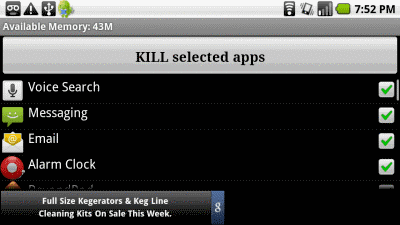
2.      Task Killer apps: ‘Advanced TaskKiller’ is one of the best app for closing the apps. You can easily download this app from Google Play. You can close all the unwanted running apps on the phone and save the battery and memory of your phone.

    It is easy to use. Open this tool and take a look at the running applications list. Tap on the apps you don’t want to kill. Tap the button ‘Kill Selected Apps’. It will close all the marked apps.


Advantage

  •          Makes your phone faster: Closing the unwanted running apps and recover the precious phone memory.

  •          Android crash Less: Your phone crash less and makes your experience more enjoyable.

  •          Save Battery: Low battery life is big problem associated with smartphones. This will help you to increase the battery life.

11 ways How to Increse Android Battery Life


For android phone users, Low battery life is a major problem. I think for smartphone users, the happiest moment is when the battery is full. There are some of the ways which can help you a lot for increasing its life.

1.      Close the apps when not needed: There is a much  chance that there are apps running in the background of the phone that you think you closed or reappear each time you reboot your device.

    For closing apps, in the ‘Settings’ screen, chose ‘Apps’. Under the ‘Running’ tab, you will find all the running applications in the background.

     You can also download “Advanced Task Killer” from the google play for this purpose.

2.      Turn off Wi-Fi when not needed: Whenever you are leaving home or moving away from a known wireless internet connection. If it’s on, it constantly look for networks to connect to. Many people try to turn off location based services (GPS) when not required. Keep  a power control widget on the home screen to easily handle the connectivity options.

3.      Brightness: The big and high resolution screen of the smartphones are the major factors responsible for less battery life. Set your phone to its minimum possible brightness by default, as it's your display that's by far the biggest user of power. Phones with bigger screen consume even more power.

4.      Syncing: Don’t have everything on auto sync at all time. With auto sync is on for all the apps and services, lots of power is used. In this way, you significantly suck up the juice in your battery.

5.      Keep it cool: Batteries work best in cooler temperatures. With prolonged warm periods, the efficiency of the battery decreases over the time. Putting your phone in a looser pocket can help you.

6.      Home Screen: The contents on the home screen are really important. Remove the live wallpaper, facebook and twitter live feed widgets. Keep only those widgets on the home screen that are really important.

7.      Internet on Wi-Fi: The Wi-Fi is generally fast. So, you can upload or download anything from the internet faster which means less connectivity time for your phone saving the phone’s battery life.

8.      Uninstall unnecessary apps: On an Android device, you can’t be sure of what is running in the background. So, uninstall the unnecessary apps to minimize the chances of any unwanted power consumption.

9.      Use battery saving apps: ‘JuiceDefender’ is one of the best apps which you can download from the google play. It is a powerful yet easy to use power manager app specifically designed to extend the battery life of your Android device. Packed with smart functions, it automatically and transparently manages the most battery draining components, like 3G/4G connectivity and Wi-Fi.

    You can also download ‘Advanced Task Killer’ for closing the unwanted running apps.

10.  Turn off the phone vibration: The tiny device inside your phone that generates the vibration uses power every time it is activated. Alternatively, set the ringer volume all the way off, past the Vibrate setting.

11.  Use Power control widget: There is a widget that you can place on any one of your home screens that gives you quick control buttons for Wi-Fi, Bluetooth, GPS, Push sync, and screen brightness. Use this to control your settings and turn them off to save battery power.

What to do When Android Crashes


Google’s android is a great thing.  I love the power of the platform and the Google Integrations but crashing of Android is a common problem faced by the people all over the world. It is really annoying create many problems.

Here are some of the ways which can minimize the crashing and enhance your android experience.

1.      Clearing Cache: A cached file is a mechanism for the temporary storage of web documents, such as HTML pages and images, to reduce bandwidth usage, server load, and perceived lag. A cached file stores copies of documents passing through it.

    The cached files are stored in the phone built-in memory, and sometimes can take a lot of storage space. Through the clearing of cached files, you are able to recover the precious phone memory space.

    You can download one of the best app ‘AppCache Cleaner’ for clearing application cache files. It increase the phone internal memory.

2.      Reboot by restarting: If an app falls over, Android ‘force closes’ it and the worst thing that usually happens is that the launcher may reload. If something goes so wrong that the system freezes, simply removing the battery and then restarting will reboot the device normally.

3.      Reinstalling app: If a particular app crashes again and again, then try deleting the app from your smartphone, and re-installing making sure you have the latest version of the app.

4.      Factory data reset: Keep it as a last option if nothing works. Go to Settings>Backup & Reset>Reset phone. This wipes all data on the internal memory of the device and returns it to an ‘out of the box condition’. It deletes all the apps as well as contacts, emails, SMS. In this way, it removes any corrupted or infected app or any other data present in the phone which was previously interfering with its functions.